COmPOSER
COmPOSER is a framework for automatically designing RF and mm-wave circuits, especially blocks like LNAs and PAs, starting from user performance targets such as frequency, gain, noise figure, bandwidth, and power. Instead of treating circuit design and layout as separate steps, it connects them into one flow so that the physical layout is considered early, not only at the very end. At a high level, the framework first estimates reasonable circuit sizes and passive values from the user?s specs. Then it turns those values into layout-ready building blocks such as inductors, capacitors, resistors, transmission lines, CPWs, and device blocks. After that, it performs placement, routing, and power-grid generation to create a full physical layout. The overall goal is to reduce manual RF design effort while still producing layouts that are physically meaningful and close to real design practice. Another important part of COmPOSER is that it is modular. A user can run the full end-to-end flow, or use only one part of it, such as the primitive generators, the router, the placement engine, or the initial sizing scripts. That makes it useful both as a complete automation framework and as a toolkit for RF layout research and development.
Paper-aligned framing
The site now follows the attached paper's framing of COmPOSER as an end-to-end RF/mm-wave synthesis flow, not just a repository of scripts.
It emphasizes layout-aware passive modeling, MILP-based placement, A*-based routing, PDN integration, and the LNA/PA evaluation story from the paper.
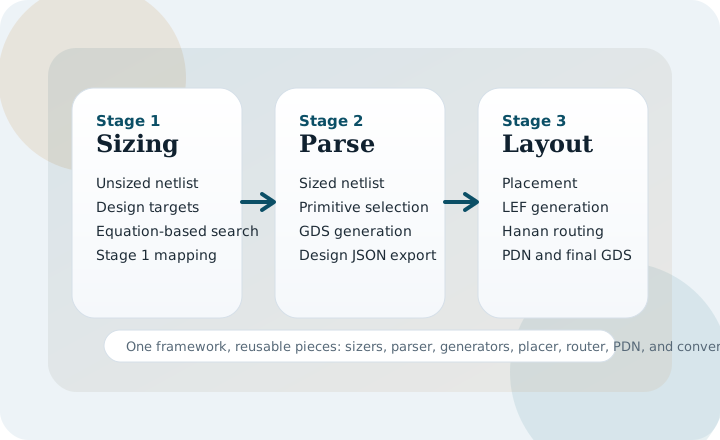
Main Stages
Stage 1
Hybrid analytical sizing computes active and passive targets from user specifications.
Stage 2
Primitive block generation turns sized elements into layout-ready GDS building blocks.
Stage 3
Layout synthesis performs placement, routing-input generation, detailed routing, and PDN creation.
Stage 4
The paper closes the loop with post-layout verification and iterative refinement.
Start Here
- Paper Overview explains how the public repo maps to the manuscript.
- Installation covers Python packages, Gurobi, router build, and the mock PDK.
- Quickstart shows the fastest way to run one of the LNA or PA examples.
- Configuration explains the main
config.jsoninterface. - Examples explains what each example file and generated directory means.
Important Notes
The CSV files in DATASETS/ are reference-format datasets. Users should generate their own datasets with the same columns and units expected by the scripts.
TheMODELS/directory is intended to hold trained.pklfiles, but those artifacts are not committed in the repo.
The mock PDK and fixed primitive GDS files are useful for validating the public flow, but they are placeholders rather than production technology assets.